MyApps
A personalised app launcher wired directly to the Entra (Azure AD) MyApps portal. Each user sees only the apps IT has assigned to them, on the intranet page they already visit. Assignments change in Entra, the web part reflects it. No bookmarks, no portal hopping, no forgotten URLs.
The Problem
IT have done the hard work - Salesforce, Workday, Jira, ServiceNow, Freshworks, whatever the stack is - all provisioned through Entra, all assigned to the right users. But users don't know where the Entra MyApps portal lives. They bookmark URLs, ask IT for links, hunt through Teams messages. The apps are provisioned perfectly; getting to them is a daily mess.
The Solution
MyApps surfaces the Entra MyApps portal straight onto the intranet. The signed-in user sees their own assigned apps - no one else's - as a clean grid of clickable tiles. Click any tile to open the app directly. IT manages assignments where they always have, in Entra, and the web part stays in sync automatically. One place to work from, the right apps for each person.
What Users See
Their Apps, On Their Homepage
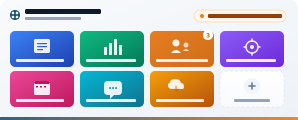
A responsive grid of the apps assigned to the signed-in user in Entra. Click any tile to open.
Personalised, Automatically
Every tile on the grid is an app IT assigned to this specific user in Entra ID. No curated list to maintain, no shared link page that's half-relevant to everyone.
What changes on each login:
- The Sales team sees Salesforce, DocuSign and their CRM add-ons
- Engineering sees Jira, GitHub, Databricks and dev tooling
- HR sees Workday, Culture Amp and learning platforms
- A new joiner sees only the apps their role has been assigned
- Remove a leaver in Entra, their tile disappears from their homepage
MyApps or App Launcher?
Two App Grids, Different Jobs
Both show apps on the intranet. One personalises per user, one curates for the whole company. Many customers deploy both.
This Web Part
MyApps
- Pulls per-user assignments from Entra automatically
- Every user sees a different set of apps
- Maintained by IT in Entra - no intranet edits needed
- Ideal for: SSO-heavy environments, licensed SaaS tools
- Needs Graph admin consent on first install
Sister Web Part
App Launcher
- Curated company-wide directory of shared tools
- Every user sees the same apps
- Maintained by your intranet team in a SharePoint list
- Ideal for: benefits portals, shared resources, policy links
- No Graph permissions required
See It in Action
Real SharePoint Deployments
Screenshots coming soon. MyApps running on customer tenants.
What You Get
Personalised app access with zero list-maintenance overhead.
Entra MyApps Integration
Connects directly to the Entra (Azure AD) MyApps portal via Microsoft Graph. Surfaces the exact same app set users would see in the MyApps portal, on the intranet.
Personalised Per User
Each user sees their own set of assigned applications - nothing else. Sales sees Sales apps, HR sees HR apps, a new joiner sees whatever their role has been assigned.
Managed Centrally in Entra
Your existing Entra app assignments are the source of truth. Add or remove an assignment, the web part reflects it automatically - no intranet pages to edit, no sync schedules to manage.
App Icons and Names
Clean responsive grid with each app's icon and name pulled from Entra. Click any tile to open the application directly in a new tab.
Configurable Display
Control the layout style, number of visible apps and display options through the property pane. A compact 6-app sidebar, a 12-app hero grid or anything in between.
Responsive and Theme-Aware
Works on desktop, tablet and mobile. The grid re-flows based on column width. Inherits your site theme for consistent styling.
Included In
MyApps Is Part of the Complete Bundle
Web parts are sold as bundles, not individually. MyApps is one of the 13 web parts added in Complete, on top of the Starter 5.
Looking for the basics only? See the Starter Bundle →
Questions About MyApps
Give Every User Their Own App Launcher
Book a 30-minute demo to see MyApps running on a real SharePoint tenant, or explore the Complete bundle.