Important Message
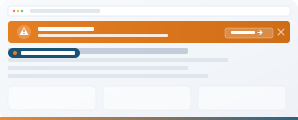
A tenant-wide alert banner for when something actually matters. System outage, building closure, urgent policy change - the whole business sees it the moment they open any SharePoint page. Permission-controlled, severity-coded, dismissible, and optionally requiring acknowledgement for the alerts that really need to be read.
The Problem
Something breaks, or something urgent happens, and you have no fast way to reach everyone. Email gets buried. A Teams message reaches the people already online. Publishing a news article takes too long, and half the business won't see it anyway because they don't visit the homepage that day. Critical information spreads by rumour.
The Solution
Important Message shows a prominent banner across the top of every SharePoint page in your tenant. Publish once, everyone sees it. Three severity levels so urgency reads at a glance. Dismissible so it goes away once read - and for the alerts that genuinely cannot be missed, you can require an explicit acknowledgement before the user continues.
See It in Action
Severity Levels and Acknowledgement
Important Message running on a real SharePoint tenant. Click any image to view full size.
What You Get
The fastest way to reach everyone when something urgent happens.
Three Severity Levels
Information (blue), Warning (amber) and Critical (red). Distinct colour coding so urgency reads at a glance - even for people who skim.
Tenant-Wide Visibility
Publish once, see it everywhere. Appears on every SharePoint page in the tenant automatically - no site-by-site deployment needed.
Permission-Controlled Publishing
Only authorised users can post alerts. Standard SharePoint permissions - typically internal comms, IT ops or a dedicated alerts security group.
Acknowledgement Required (Optional)
For alerts that absolutely must be read - safety notices, mandatory policy changes, regulatory updates - require an explicit acknowledgement click. Provides a record that every user has confirmed receipt.
Dismissible (When You Want)
Users dismiss once they've read it. Configurable per alert - you can force critical messages to remain visible until the issue is resolved.
Start and End Dates
Schedule alerts to appear and disappear automatically. Perfect for planned maintenance windows - no one forgets to take the message down afterwards.
Optional Link for Detail
Attach a link to a status page, full article or incident report for users who need more detail than the banner provides.
Included In
Important Message Is Part of Both Bundles
Web parts are sold as bundles, not individually. Important Message is one of the Starter 5 and is also included in Complete.
The Essential 5
Important Message plus Welcome Banner, News Carousel Pro, Employee Directory and App Launcher. Everything you need for a modern-looking homepage.
View Starter Bundle →
All 18 Web Parts
The Starter 5 plus 13 more: recognition, personalised email and calendar, navigation, polls, org chart and more. The complete toolkit.
View Complete Bundle →
Questions About Important Message
Never Let Critical Information Spread by Rumour
Book a 30-minute demo to see Important Message running on a real SharePoint tenant, or explore the bundles.